


Take Her For A Spin!
Labels:
5 stars,
app,
application,
Flickr,
iphone,
offline,
Sygic,
Sygic Mobile Maps
0
comments
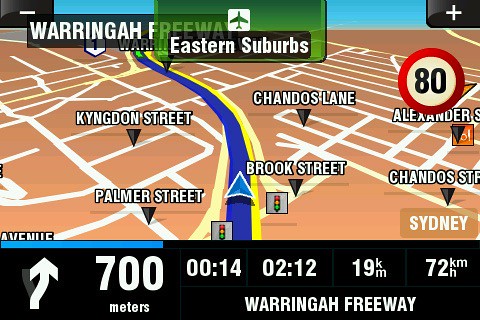
 Sygic Mobile Maps Australia and New Zealand (AU$79.99) is the ultimate driving companion, especially if you are prone to getting lost, or just love to go out for a Sunday drive, and need a means of getting home. This review has been based on the Australia and New Zealand version, althought everything exept the maps themselves, is the same no matter what country's version you are using. In this review I will not be comparing a GPS app to a classic street directory, nor will I be comparing it to it's various competitors, but I will be providing you, yes you, our valid readers with a comprehensive list of features, and all the little things that I found, which earn Sygic Mobile Maps a place on my home screen.
First of all, set the price aside. The GPS app market is expensive. However, Sygic's prices have been very competitive. You cannot expect to find a good quality GPS app, with all the bells and whistles for under $10. If you only need to overlay directions on a 2D map, there's already an app for that, and it came with your phone! However the hefty data charges it incurs whilst being used are more than a put off. This is where Sygic Mobile Maps begins to shine. The large file size of the app isn't without it's benefits. You are actually downloading the complete map, full of points of interest, straight to your device. I'll say this now and make it clear, Sygic Mobile Maps has absolutely no data fee's.
After thorough testing, and miles on the road, I have found a few things about Sygic Mobile Maps, that really sell it to me.
We all know that GPS signals can be slightly unreliable at times, depending on your location. This is because, to work successfully, your phone needs many satellites in it's line of sight. Simply, the more GPS satellites in sight, the stronger the signal and vice versa. Thankfullly Sygic has gifted us with numerous ways to begin tracking a route. You can elect to start from any location, or point of interest (POI), or choose to wait or a valid signal. This means that you can get going without a wait, unlike some more unreliable GPS solutions.
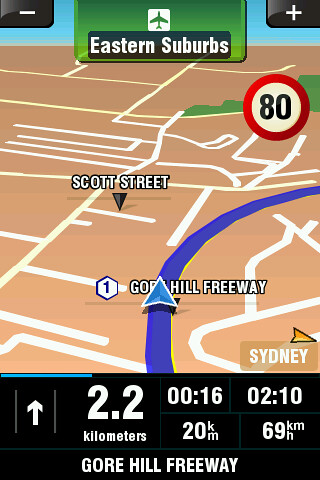
But the real zinger of Sygic Mobile Maps is the turn-by-turn voice navigation it provides. You can select from a multitude of voices, in many different languages, to let you know where to go without the distraction off picking up your device. My favourite voice, which I personally recommended is called "English UK (Simon)". Try getting a street directory to talk to you in the same way (not now, keep reading!). You won't be able to.
The interface also rotates depending on the orientation of your iPhone. So if it us docked (which I highly recommend for extensive use, all GPS apps drain battery like there is no tomorrow) on it's side, the view will switch to landscape mode, providing you with a much wider view of your surrounding area.
The highly configurable "dashboard" allows you to display all the information you need, and remove what you don't. Possibilities include GPS signal strength, time you began, estimated time of arrival, your current speed or direction, how many minutes you've been on the route for, and how many minutes are left before you reach your destination. You can also change the map between a 3D and flat mode to suit yourself, as well as change the colour scheme to (or automatically) change between day and night variants. The interface also tells you the current speed limit, and warns you if you have exceeded this.

Now onto the fun stuff. Planning a route is simple an quick. You can select a destination from an extensive list of POI's, 'favourited' locations, your phones contacts, or enter one manually. You can then select a starting point. Whether this is your driveway, or your current location is up to you. You can also elect detours, or add in another destination on the go, althought neither I, Sygic nor your local authority recommend operating this while driving. You can also choose to avoid toll roads, and set automatic route planning methods to the fastest, shortest or most economical route depending on your needs.
But what happens if you don't follow the exact route Sygic Mobile Maps gives you? Maybe you missed a turn, or maybe you (wrongly) think that another route is shorter. Either way, Sygic has you covered! Your route will be recalculated to get to your destination according to the settings in use.
In short, Sygic Mobile Maps is all about you. Not only is it the top grossing app, (in the Australian App Store anyway), but its highly configurable interface and route options allow you to get to your destination with ease, and hey, when you're told when you're speeding, and shown where all the speeding and red light cameras are located in the current area, as well as being provided with audible turn by turn navigation, and quick re-routing options in the case of a wrong turn, Sygic Mobile Maps is the back seat driver you've always wanted.
MyAppSource Rating: 5 Stars!


